

NICDSign 3.0 is a redesigned digital signing solution built as a lightweight native desktop application using Rust and Tauri 2, supported by server-side APIs. By eliminating the need for Java on the client side, it delivers significantly improved performance, enabling signing speeds of up to 12 documents per second. The platform introduces features such as Fill and Sign, flexible signature placement, local audit logging, simplified installation, and an enhanced user experience.
Digital signatures play a critical role in ensuring the authenticity and integrity of government documents. For several years, NICDSign has served as a trusted digital signing solution across government applications. It supports Windows, Linux, and macOS, and integrates seamlessly with applications developed using Java, PHP, .NET, and other technologies.
With the rapid expansion of online government services and growing document volumes, the earlier version of NICDSign began to face scalability and usability challenges. Its dependence on Java increased installation complexity and impacted performance. A faster, more secure, and user-friendly solution became necessary.
NICDSign 3.0 was developed to address these requirements. Built using Rust, a high-performance memory-safe programming language, and powered by the Tauri 2 framework, it operates as a lightweight native desktop application. Designed as a drop-in replacement for earlier versions, it requires no changes to existing application integrations. NICDSign 3.0 delivers improved performance, enhanced security, and a streamlined signing experience for e-Governance applications.
Features of NICDSign 3.0
Flexible Signature Placement and Visual Customisation
NICDSign 3.0 offers multiple options for placing visible signatures on documents. Users can double-click anywhere on a document to place a signature or drag it to fine-tune the position. Developers can also use a keyword-based API to automate signature placement, particularly useful for standardised forms where signatures must appear at predefined locations.
The size and appearance of signatures can be customised using scale values and themes. For applications requiring signatures across multiple pages or locations, multi-widget and all-page stamping options are also available.
Simple Setup with Automatic Token Detection
NICDSign 3.0 can be installed and configured with minimal effort. On first launch, the application automatically detects connected DSC tokens. If the required driver is unavailable, the application identifies the token model and prompts users to install the appropriate driver.
The simplified setup process enables users to get started quickly, while detailed and user-friendly error messages facilitate faster issue resolution.
Signer Preview, Certificate Details, and Audit Log
Before signing, users can view certificate details along with a thumbnail preview of the document showing the signature placement. The main application window displays certificate information, including issuer details and validity status, along with a list of recently signed documents.
NICDSign 3.0 also maintains a local audit log containing details such as document name, date, and time of signing, providing an additional layer of accountability.
Fill and Sign
The Fill and Sign feature enables applications to send PDF forms with AcroForm fields directly to NICDSign 3.0. Users can review or update form fields, place their digital signature, and submit the completed document without printing, manually signing, or scanning.
This feature is particularly useful for online service delivery workflows where forms require both verification and digital signing.
JSON Data Signing
In addition to PDF and XML documents, NICDSign 3.0 supports digital signing of JSON data. Users can review the content in tree or grid format before signing, ensuring transparency and verification of the information being approved.
Technologies Used
Tauri 2: Tauri leverages the operating system's native web engine instead of bundling a large runtime such as Java. This significantly reduces application size, startup time, and resource consumption.
Rust: The signing engine is developed using Rust, known for its performance, reliability, and memory safety. It supports concurrent processing of signing operations while maintaining application responsiveness.
PKCS#11 Token Support: NICDSign 3.0 supports standard PKCS#11-compliant DSC hardware tokens used across government deployments on Windows, Linux, and macOS.
Document Signing Flow
One of the key enhancements in NICDSign 3.0 is its ability to process bulk signing requests efficiently. Through REST APIs, applications can submit batches of documents for signing. The Rust-based signing engine processes these requests in parallel and communicates with the PKCS#11 token to digitally sign each document.
The solution can process up to 12 documents per second. During execution, a live progress indicator displays the status of completed documents. The application remains fully responsive throughout the process, ensuring a smooth user experience without interface freezes or delays.
NICDSign 3.0 also supports the What You See Is What You Sign (WYSIWYS) feature, allowing users to view documents before signing. This feature can be enabled or disabled through application settings.
Benefits and Impact
- Faster Document Processing: High-speed bulk signing improves efficiency and accelerates service delivery.
- Ease of Use: Automatic token detection and simplified installation make the solution accessible to both technical and non-technical users.
- Seamless Migration: As a drop-in replacement for earlier versions, existing integrations continue to function without requiring modifications.
- Enhanced Security: Removal of Java dependencies and the use of Rust's memory-safe architecture reduce the application's attack surface. Local audit logs ensure signing records remain on the user's device.
- Dedicated Support: The NICDSign team provides assistance for both new integrations and migration from earlier versions.
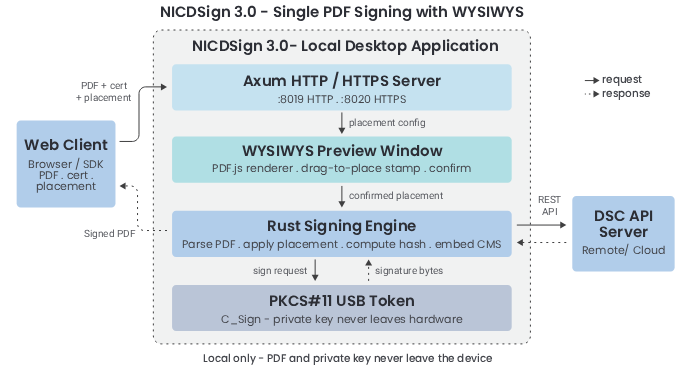 Fig: 12.1 : How NICDSign 3.0 processes a single signing request from a web client
Getting Started with NICDSign
All resources related to NICDSign are available through the NICDSign portal.
Integrating NICDSign with Web Applications
Requests for integration can be submitted through the NICDSign portal. Following review and approval, the NICDSign team provides the required documentation and technical support.
Try the Demo
A live demonstration environment is available on the portal. Users can explore key features and test signing workflows using a valid DSC token after installing the NICDSign client application.
Installing NICDSign 3.0 on Windows
For a clean installation:
- Uninstall any existing version of NICDSign and ensure the appropriate token driver is installed.
- Download and run the NICDSign 3.0 installer from the portal.
- During installation, approve the certificate installation prompt. This adds the required certificate to the Windows Certificate Store and enables secure HTTPS communication.
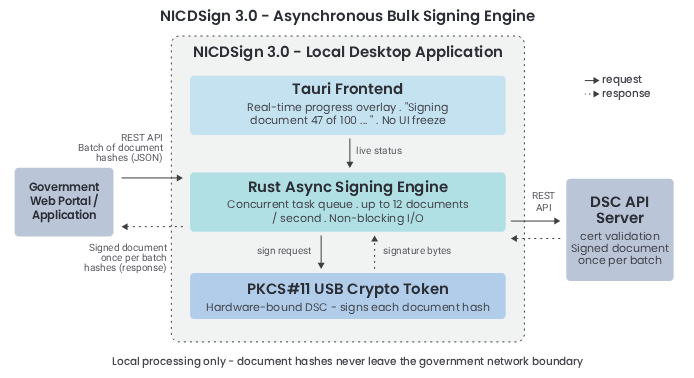 Fig: 12.2 : How NICDSign 3.0 processes a bulk signing request from a government web portal
Way Forward
Efforts are underway to further strengthen the robustness and stability of NICDSign across Windows, Linux, and macOS, ensuring a consistent and reliable user experience.
Future enhancements include integration with Aadhaar-based eSign services, enabling citizens without DSC hardware tokens to digitally sign documents. Support for cloud-based digital signatures is also being explored, offering greater flexibility and device-independent signing capabilities.
- Edited by:C.J. ANTONY
Author / Contributor

V.T. Santhosh Dy. Director General & SIO vt.santhosh[at]nic[dot]in

T. Edward Sam Sr. Technical Director edwardsam[at]nic[dot]in

Beena G. Technical Director beena.g[at]nic[dot]in

Cebil T.A. Scientist-B cebil.ta[at]nic[dot]in
- Tag:
- Internet
- Technology
- eGov
- Tech
V.T. Santhosh
Deputy Director General & SIO
NIC Keralam State Centre
CDAC Building Vellayambalam, Thiruvananthapuram
Keralam - 695033
Share